SoundShade: Because macOS Volume Control is Broken
If you connect a Mac to a third-party monitor (like my Dell U2723QE) and try to change the volume using your keyboard, you will be greeted by a giant grey speaker icon with a big fat “No” sign (🚫). This issues doesn’t exist in Windows.
Yes, in the year 2026, macOS still refuses to control external display volume out of the box.
You basically have 02 choices:
- Physically reach behind the monitor and awkwardly wiggle a tiny joystick/button like you’re playing a retro arcade game.
- Install third-party tools that either sound like a jet engine or randomly cause your AirPods to crackle and pop like microwave popcorn.
I got tired of wiggling joysticks, so I decided to build SoundShade.
What is SoundShade?
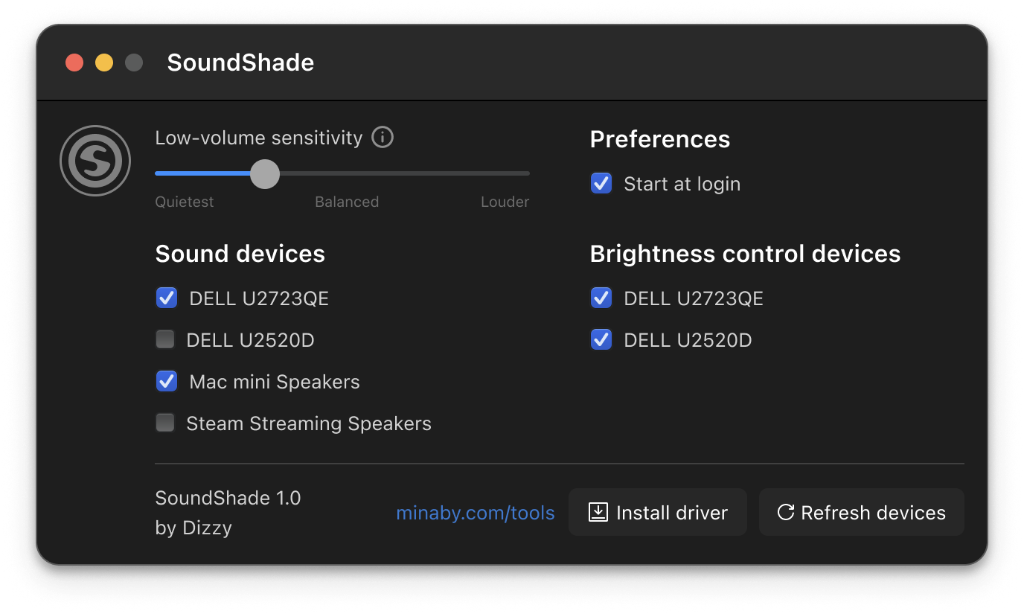
It’s a tiny, lightweight Menu Bar app that lets you control your external monitor’s physical brightness and audio volume without losing your mind.
Here’s the simple recipe:
- Physical Brightness: It talks directly to your monitor’s hardware (DDC/CI) to turn down the backlight, so your eyes don’t burn at 2 AM.
- Volume Control: It adjusts the audio level (even system’s sounds) digitally before sending it to the screen’s Line-Out port.
- Smart Bypass: The moment you connect AirPods or Bluetooth headphones, SoundShade steps aside and lets macOS handle the volume natively. No audio crackling, no weird latency.
No complex setups, no bloated drivers. Just a simple slider that makes external screens behave the way they should have from day one.
The project is open source under the GPLv3 license. You can find the source code, play around with it, or contribute over on GitHub: minaby/soundshade.
Download SoundShade
Download the app from GitHub Releases